Sonarr Schedule Rainmeter Skin
A few days ago, I shared my Plex Activity Rainmeter skin which I built to monitor live streams. It’s been a game-changer for my second monitor setup, but it left a gap: I still had to open a browser tab to see when the next episode of The Last of Us or House of the Dragon was airing.
Consistency is key, so I spent the last few nights porting that same minimal aesthetic over to a new project: the Sonarr Schedule Rainmeter Skin.
The Overview
If you use Sonarr to manage your TV library, you know the "Calendar" view is one of its best features. The goal for this Rainmeter skin was to bring that "glanceable" Sonarr schedule directly to your desktop. I don't need to see my entire library; I just need to know what's happening today, tomorrow, and later this week.
This skin is built to be lightweight and stay out of the way until you need it, perfect for anyone looking for a clean Sonarr desktop widget.
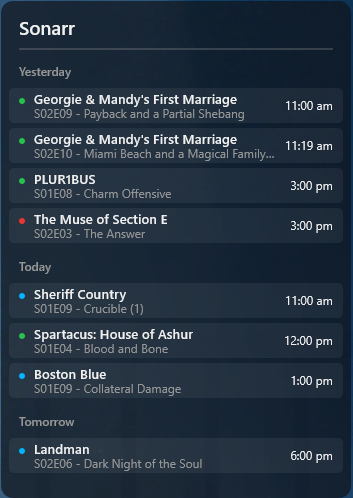
- Dynamic Grouping: Episodes are automatically sorted by day (Yesterday, Today, Tomorrow, etc.).
- Status at a Glance: Small color-coded indicators tell you if an episode is already downloaded, missing, or still waiting to air.
- Rich Details: Hovering over any entry pulls up a tooltip with the episode title and a full synopsis.
Installation
Just like the Plex skin, this requires Rainmeter and access to your Sonarr instance (either local or remote). Getting your Sonarr schedule on your desktop only takes a minute.
Step 1: Download
Download the latest .rmskin package from the GitHub releases page.
Step 2: Install
Double-click the file and follow the Rainmeter prompts. Ensure "Load included skins" is checked.
Configuration
The setup is straightforward. You’ll need your Sonarr API key and the URL of your server to link the Rainmeter skin to your data.
Right-click the skin, select Open folder, and navigate to @Resources/variables.inc. Here are the vital lines to get your Sonarr schedule working:
[Variables]
; --- CONNECTION ---
SonarrURL=http://localhost:8989
SonarrAPIKey=YOUR_API_KEY_HERE

; --- DISPLAY ---
MaxDaysToShow=5
ShowYesterday=1
Width=350
Once you’ve updated your details, hit Refresh and your schedule should populate instantly.
Status Guide
The skin uses a simple traffic-light system to keep you informed about your library status:
- 🟢 Green: Downloaded and ready to watch.
- 🔵 Blue: Unaired (Upcoming).
- 🔴 Red: Aired but missing from your library.
Under the Hood
Underneath the simple UI, there’s a decent amount of Lua logic handling the Sonarr API response. Sonarr returns a flat list of episodes within a date range, but I wanted them grouped by day with relative headers (like "Today" or "Tomorrow").
The SonarrParse.lua script iterates through the JSON payload, compares timestamps against the current system time, and dynamically generates the meter groups for this Sonarr Rainmeter skin.
-- How we handle the "Yesterday/Today/Tomorrow" logic
local function GetRelativeDate(dateStr)
    local diff = os.difftime(itemTime, todayStart) / 86400
    if diff < 0 and diff > -1 then return "Yesterday"
    elseif diff >= 0 and diff < 1 then return "Today"
    elseif diff >= 1 and diff < 2 then return "Tomorrow"
    else return os.date("%A, %b %d", itemTime) end
end
This approach allows the skin to stay compact while providing a lot of context. It also means the skin width and font settings are fully customizable without breaking the layout.
If you’re a Sonarr power user looking for a Rainmeter skin for Sonarr, give it a spin and let me know what you think on GitHub!
<terminate_session />